
What would you like to learn more about?
Eligible locations
Customers on Fibre to the Node (FTTN) or Fibre to the Curb (FTTC) technologies in selected areas may be eligible to upgrade to Fibre to the Premises (FTTP) with a plan based on our eligible wholesale higher speed tiers^.
The eligible locations have been selected for reasons including:
- Demand – we anticipate strong demand in these metropolitan and regional locations for higher wholesale speed plans.
- Workforce – our established construction and delivery partners, and their respective workforces, are ready to work here having recently completed our network’s initial build.+
- Cost-effectiveness – we can deploy here with speed and agility, in a way that our investment is most likely to spread and multiply economic activity across the nation.
Our aim is to extend fibre to an additional 5 million homes and businesses by the end of 2025.
It’s important to note that not every premises in the towns and suburbs listed will be eligible, so seeing your location listed above is not a guarantee that you will be able to upgrade to our higher speed tiers as part of these releases.
We’ll keep you updated on our progress to evolve the nbn network so check back regularly for the latest news, or register for updates.
If your premises is not eligible right now, it may become eligible before the end of 2025. You can register for email updates and we will advise you if your premises becomes eligible Alternatively, you can regularly check your address on our website to find out if your location is eligible.
nbn’s role is to improve and upgrade the nbn network as Australia’s connectivity needs increase and to ensure we provide access to the broadband speeds that Australia needs. So stay tuned as we look to build more fibre into the network in the future.
We totally understand! That’s why we already offer a range of wholesale speeds for residential and business customers.*
We have a range of residential speed tiers and we also have options to suit businesses. Please note that the availability of these speed tiers depends on your access technology.
We recommend chatting to your preferred phone and internet provider to find the right speed tier to suit your needs. You can also learn more about making the most of your internet experience.
Many premises in apartment blocks are served by our Fibre to the Building (FTTB) network, and there are currently no plans to upgrade these services to Fibre to the Premises (FTTP).
Around 25% (500,000) of the two million Fibre to the Node (FTTN) premises planned for upgrades are multi-dwelling units (MDU) such as apartments, townhouses and mixed-use business/residential.
There are a number of additional complexities involved in building to these types of premises such as common areas, access to communications rooms and strata engagement.
Given such complexities, we are currently trialling a build solution for FTTN to FTTP upgrades to MDUs. We expect to commence the build program around mid-2023.
Connecting to a new FTTP service with a participating provider
Eligible customers will have to place an order with a participating phone and internet provider and purchase a plan based on our eligible wholesale higher speed tiers^ to upgrade to FTTP.
- For locations on FTTN: If you are eligible and you would like to upgrade to FTTP, you will need to order a plan based on Home Fast or higher^.
- For locations on FTTC: If you are eligible and you would like to upgrade to FTTP, you will need to order a plan based on Home Superfast or higher^.
Depending on factors such as complexity and your building type, additional costs may apply to providers, who may choose to pass this charge onto their customers. We recommend speaking to a participating provider to find out about costs to you.
The nbn approved technician will install Fibre to the Premises (FTTP) connection in parallel to your existing Fibre to the Node (FTTN) or Fibre to the Curb (FTTC) connection.
Once you have spoken to your FTTP provider and are satisfied that your FTTP service is up and running, you may need to arrange the transfer of services from your original technology (FTTN or FTTC) connection to your new FTTP connection.
We recommend checking with your original provider that your plan on the original technology (FTTN or FTTC) has been cancelled, so that you can avoid being charged for services on both technologies. Your provider will be able to help you through this process.
Unless you have cancelled your original service, it may remain active. If nbn decides to turn off the original technology at your premises, nbn will inform your phone and service provider at least 18 months prior, so you will be given plenty of notice before this might occur.
The nbn approved technician will install and test the equipment, so that it's ready for your provider to finalise the connection of the new FTTP service.
Please follow your FTTP provider’s guidelines for connection. This may include replacement or upgrade of your existing modem or router, as advised by your provider.
If you are experiencing service disruptions, outages or issues then please follow your provider's advice regarding any issues with your services. If the issue is nbn network related, your provider will make direct contact with nbn to resolve on your behalf.
Installation process (pre-installation and installation appointments)
Your provider will help to schedule the following:
Pre-installation visit
To prepare for your installation appointment, a technician will visit your location to conduct an initial assessment of the outside of your home. This will help us identify any obstacles early and prepare for your upcoming installation appointment.
Installation appointment
A technician will arrive at a later time to install the equipment at your premises. They will test that the equipment has been installed correctly before they leave, so that it's ready for your provider to finalise the connection of the new FTTP service.
Pre-installation visit
- In most cases, this visit will take on average between 45 mins to 1.5 hours. Please keep in mind that complex connections may take longer
- You, or an authorised person over the age of 18, do not need to be present for this appointment.
Installation appointment
- In most cases, this visit will take between 3 to 4 hours. Please note it could take longer for complex connections
- You, or an authorised person over the age of 18, need to be present for this appointment.
The technician may find that additional pre-installation work is needed.
Our aim is to either return before your scheduled installation appointment or complete the work during the installation appointment. Your preferred provider will advise if any changes to your appointment are required.
Additional minor work may include the installation of new underground nbn infrastructure, such as an upgrade to a pit or replacement of conduit, or above ground, such as a new pole mounted bracket or aerial lead in from the street where necessary.
You or an authorised person over the age of 18, do not need to be present for this visit.
The technician will install the following equipment both inside and outside your premises:
- The utility box (also known the Premises Connection Device or PCD) on the outside of the premises
- The connection box (also known as the Network Termination Device or NTD) on the inside or outside of premises
- Power Supply Unit inside the premises
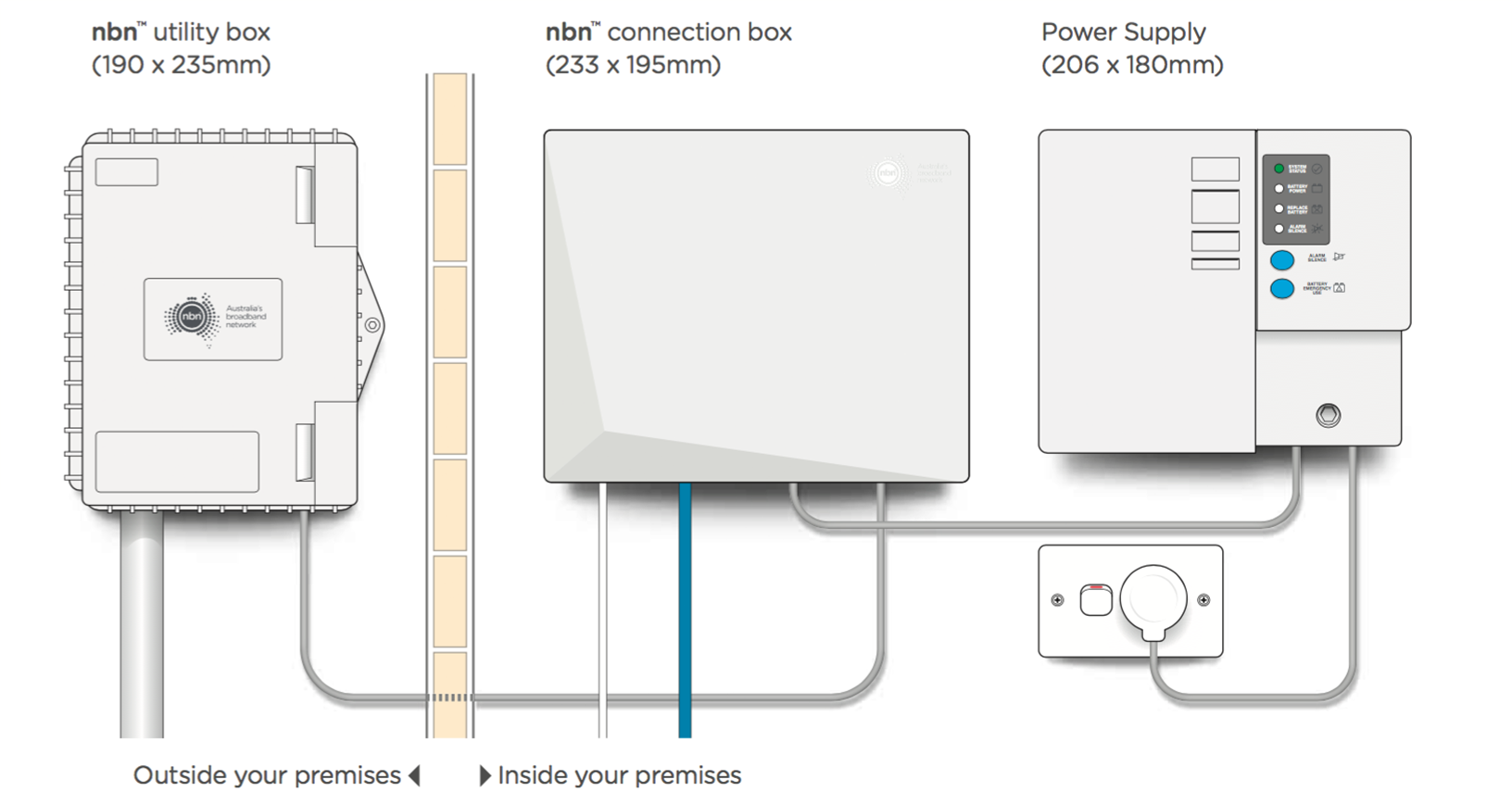
Where possible, our technicians will try to accommodate your first choice of location.
Please keep in mind that health and safety considerations and some environmental factors such as complex walls, distance to power sources, and proximity and accessibility to the exterior utility box will influence where the technicians can install the equipment.
Therefore, it may not be possible to have the new nbn connection box installed in the same location as your original technology connection points.
Yes. If you are renting your property, make sure that you have the landlord or property manager’s permission before the installation day.
The technician may need to do work that they need to know about – such as drilling into the property walls.
As we are working on a live network, there may be times where there are temporary interruptions to your service. If an outage is required, it could be anywhere from 15-30 minutes depending on required remediation activities and the technology that currently services your premises. Your technician will advise you on the day if an outage is required.
For locations currently connected to FTTC, there may be a planned outage of around 30 minutes on the day while the technician works on the infrastructure on the street that connects your premises. Your preferred provider will let you know if this is the case.
nbn will select the optimal way to service the premises based on site conditions. There may be slight disruption (i.e. hand digging) around your premises to prepare for your pre-installation visit.
Additionally, movement of items like bins or gardening pots may be required. Sometimes these steps are necessary to clear the pathway for your pre-installation appointment. The technician can be expected to return all items to their original location.
It is likely that after their initial visit, the technician has identified some issues that make adding an Fibre to the Premises (FTTP) connection to your premises complex.
Your FTTP provider can be expected to contact you to provide further information and discuss your options.
Device compatibility
Your FTTP provider can guide you what devices you need to connect to the new FTTP connection.
For modems, most nbn compatible modems will work across different technologies. Your provider can help you to check the compatibility of your existing modem with your new FTTP connection, troubleshoot any issues and identify any new connection devices you may need.
Important notes
Conditions, eligibility criteria and costs will apply – please speak with your preferred provider. Eligibility criteria includes among other things, being designated by nbn as a simple premises and placing an order for an nbn powered plan based on an eligible wholesale speed tier where required. Additional costs may apply to providers, who may choose to pass this charge onto their customers.
Please note that network construction will be an ongoing activity beyond the initial volume build for future new developments and a small proportion of premises defined as ‘complex connections’ – which includes properties that are difficult to access, culturally significant areas and heritage sites – where connection depends on factors outside of nbn’s control such as permission from traditional owners.
nbn provides wholesale services to phone and internet providers. nbn wholesale speed tiers available to providers vary depending on the access technology in an end customer’s area. An end customer’s experience, including the speeds actually achieved over the nbn broadband access network, depends on the nbn access network technology and configuration over which services are delivered to their premises, whether they are using the internet during the busy period, and some factors outside of nbn’s control (like their equipment quality, software, chosen broadband plan, signal reception, or how their provider designs its network).