
Whether you want mobility, convenience or reliable speed, there’s a connection type that will suit your needs. Wireless, wired or a combination of both – let's find the right connection type for you.
Wi-Fi, wired, or both?
Your router can connect to your devices through either wired or wireless connections, giving you the flexibility to roam with Wi-Fi or the dependability of a wired connection. There are great reasons to go for either, or you can combine the two connection types to optimise your home setup in a way that works for you.
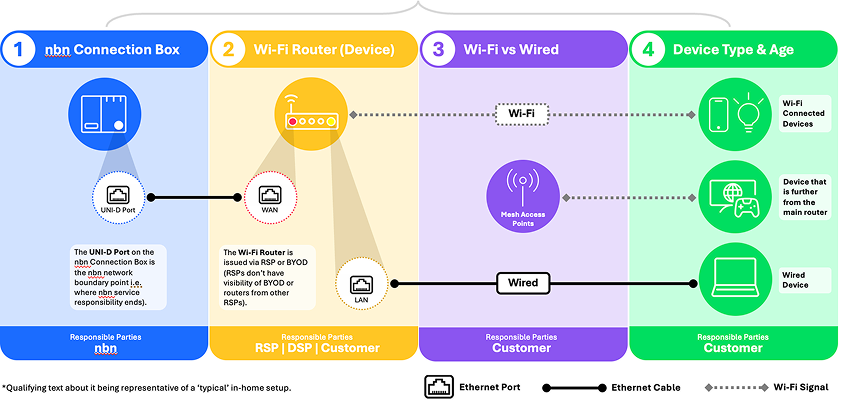
Wi-Fi: A Wi-Fi connection means your router is the only device physically connected to your nbn connection box. It then connects wirelessly to your devices or mesh network nodes via a Wi-Fi signal.
Wireless is a great option because the wireless signal can travel around your home or business without wires and is generally sufficient in a small property. It offers convenience and mobility, allowing you to connect to the internet wherever there is Wi-Fi signal.
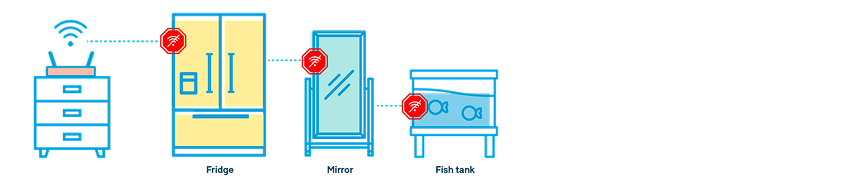
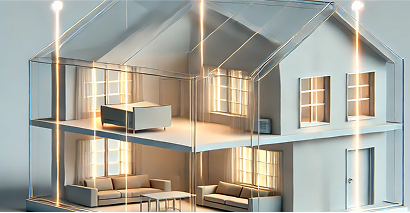
However, depending on your home or business’s layout, you may experience lag or drop-outs the further you move away from your router, due to interference from thick walls, appliances, or simply the distance the Wi-Fi signal has to cover.
Wired: When you need reliability and speed, a wired connection can cut out the guesswork and help ensure your internet is on point. It might sound techy, but simply put, a wired connection means using an Ethernet cable, also known as a Local Area Network (LAN) cable, to connect your devices directly to your Wi-Fi router, or adding a wired connection between your mesh network nodes.
A wired connection typically offers a faster, more stable online experience with less interference than Wi-Fi. Plus it’s generally a more secure connection with less risk of unauthorised access.
Plan with a registered cabler to install internal wiring, such as in your wall or ceiling, and multiple Ethernet ports around your property.
Why not both? Want the convenience of Wi-Fi but have some devices that demand more speed and bandwidth?
You can continue to use Wi-Fi, while connecting individual devices like your smart TV or gaming console to your Wi-Fi router using Ethernet cables, ensuring a faster, more reliable connection where you need it. Or you could use a mesh network and connect the nodes via Ethernet cabling, reducing the demand on your Wi-Fi and giving you a more stable connection and stronger Wi-Fi signal from those nodes.
Types of cables for a wired connection
There are two types of Ethernet cables you’re likely to come across, both of which can be purchased from tech retailers:
Shorter cable: Also referred to as a patch cable, these usually come in the box when you buy a new Wi-Fi router, and are often used to connect a device like a smart TV or home computer.
Structural cable: This is the cable installed in-wall by a registered cabler – it’s made to cover longer distances to help connect two areas of your home or business. New installations should ideally use at least CAT 6 cables, since older cables might not support higher nbn speed tiers..
Building or renovating?
Avoid extra work down the track – map out your cabling requirements now so it's installed while you build. That way you can be ready to connect once you complete your construction. Talk to a registered cabler for support.
Keep the future in mind?
The average household globally now has around 25 connected devices1 – making the demand for more data higher than ever before. So it’s worth thinking about what’s coming in the future.
Is your home relatively large, with thick walls and/or multiple levels? Are you planning to integrate more smart home devices, like EV chargers, smart appliances or security cameras, into your home? Having the flexibility to connect devices directly via a wired connection rather than relying solely on Wi-Fi means you can enjoy fast and reliable internet throughout your home, with fewer headaches troubleshooting.
Tips:
- Ask a registered cabler about installing additional Ethernet sockets (or data ports) in areas of your home where there’ll be a lot of internet usage, like lounge rooms, offices, or games rooms.
- Decide where the main or most central area of your premises is – that’s where your Wi-Fi router should go.
- Think about two to three other areas where the internet will be used a lot, like home offices or living rooms, and consider whether you want to have data or Ethernet ports installed there.
Understanding your nbn connection box
The nbn connection box is what connects your home or business to the internet.
Wired vs Wireless - which is right for you?
To create a great online experience, you can utilise a wired connection, Wi-Fi, or a combination of both. Wi-Fi offers the freedom to move around, while fixed cabling can support data hungry devices.
More information and assistance
Would you like to learn more? Check out our list of frequently asked questions.