
Combine the speed of your internet plan with Wi-Fi coverage throughout your home or business. Follow our checklist on how you can help maximise your home or business Wi-Fi connection.
How Wi-Fi works
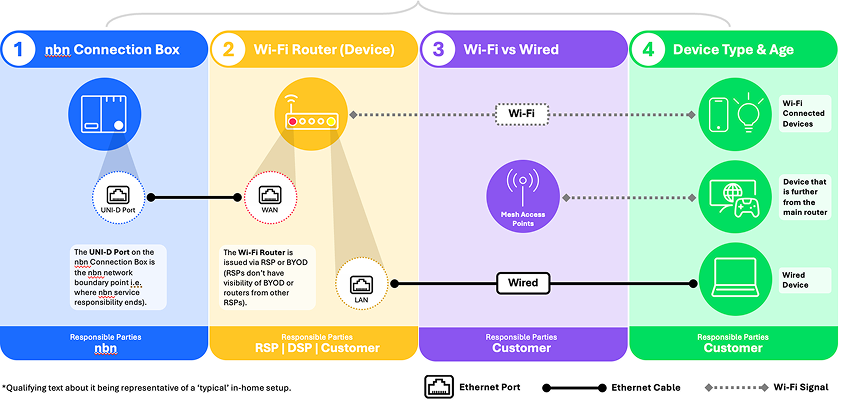
Think of your Wi-Fi router as the ‘heart’ of your internet connection. From a single link with the nbn connection box inside your home or business, your router shares a network among all of your connected devices using a Wi-Fi signal. This allows devices such as computers, mobile devices, and other equipment, like security cameras and EV chargers, to interface with the internet. The strength of this wireless connection depends on distance and the obstacles between your Wi-Fi router and your devices.
Why your Wi-Fi router's location matters
The layout, construction and size of your property can have a significant bearing on your Wi-Fi signal and connectivity experience - so it’s vital to place your router where it can create the most effective coverage.

Materials that can reflect, absorb, and reduce your Wi-Fi signal include:
- Thick walls – Brick or cement walls, floors, ceilings
- Metal panels – Cupboard doors, mirrors, shelves
- Appliances – Refrigerators, televisions, microwaves
- Liquids – Fishtanks, hot water systems
- Other technology – Radios, baby monitors, Bluetooth devices
Tips to improve your Wi-Fi router connectivity:
- Place your Wi-Fi router as close as possible to where the most connected devices are used most often.
- Try to place your Wi-Fi router in a raised and central area – avoid placing on the floor, in a cupboard, or behind furniture.
- Aim for line-of-sight between your Wi-Fi router and connected devices, with the signal passing through as few objects as possible.
- Larger or multi-story property? A Wi-Fi mesh network, linking multiple routers or access points throughout the property, can provide more reliable, scalable coverage. Speak to your preferred internet provider or tech retailer to help you make an informed decision.
Optimisation checklist:
- Is your router hidden in a cupboard, behind furniture, or blocked by thick walls?
- Is your router close to the majority of your connected devices with line of sight?
- Do you have a larger or multi-story property that might need more coverage that one Wi-Fi router can provide?
How many devices are you using?
The average household globally now has around 25 connected devices in the home1. In short, we’ve never been more connected.
With connectivity comes demand on your Wi-Fi router, affecting your internet speed. Think of your speed plan as a pie, with each connected device sharing a slice of the pie. When multiple devices are connected to your Wi-Fi router at the same time, it can slow down your internet speed.
If you have the newer TVs, gaming consoles, and tablets etc; even if your router is only a few years old, it may not be compatible with newer technology and be able to deliver the speeds you want your devices to achieve. Like all devices, they get slower with age as new technology can demand higher performance.
What are Wi-Fi bands and why do they matter?
Wi-Fi signals are sent out from your Wi-Fi router in two main frequencies: 2.4GHz or 5GHz, and more recently, 6GHz. Generally speaking, 2.4GHz provides greater coverage but lower speeds, versus 5GHz which provides faster speeds, but a smaller coverage area.
Traditionally, users could [manually] choose which band to connect to when selecting their Wi-Fi network. Whereas today, most modern routers use “Wi-Fi Band Steering” as a default setting. This is a feature that dynamically assigns your devices to the appropriate Wi-Fi band to optimise your Wi-Fi performance throughout your home without manual intervention.
If you would like to check the settings or change them, speak to your preferred internet retailer or technology provider for further assistance.
When A wired connection can help
A Wi-Fi (wireless) connection is convenient, but sometimes you need a connection with greater stability and just a little more ‘oomph’. Larger or multi-level homes can benefit from using Ethernet/Local Area Network (LAN) cables to connect devices directly to your router.
Benefits to a wired connection:
Building or renovating? Avoid extra work down the track – map out your cabling requirements now so it's installed while you build and ready for when you need to connect.
Check your Wi-Fi performance with a speed test
A speed test will help you understand how your Wi-Fi signal strength is performing in different parts of your home. A weaker Wi-Fi signal often means slower, less reliable speeds.
For accurate results we recommend comparing your internet speed with a wired (Ethernet cable) connection, and then again using a Wi-Fi connection in different parts of your home.

How to do a speed test
- Search for a speed test in your browser on your device.
- Run the test from directly in front of your Wi-Fi router and take note of your speed.
- Repeat at different locations throughout your home and record results to monitor how the speed changes as you move around.

Understanding your speed test results
If the speed of your nbn plan or the speeds you recorded while connected by Ethernet cable are similar to the speeds you recorded while connected by Wi-Fi in different parts of your home, your Wi-Fi signal should be adequate and capable of providing consistent speeds.
Note: If you are unhappy with the speed you’re getting inside your home, talk to your provider. It could be the nbn speed plan you’re on, or another network issue that needs to be investigated.

Significant difference in wired vs Wi-Fi speeds
If the speed of your nbn plan or your recorded speed over Ethernet cable is significantly faster than those recorded over Wi-Fi, or if some locations in your home are faster than others, this is an indication there is room for improvement with your existing home Wi-Fi set up.
Note: Your speed results are impacted by a range of factors including: the age of your Wi-Fi router, how many devices are in use at the same time, your nbn speed plan, obstructions that can interfere with your Wi-Fi signal, and whether you are using the internet during the busy period (typically 7-11pm).
Check your Wi-Fi performance with a speed test
A speed test will help you understand how your Wi-Fi signal strength is performing in different parts of your home. A weaker Wi-Fi signal often means slower, less reliable speeds.
For accurate results we recommend comparing your internet speed with a wired (Ethernet cable) connection, and then again using a Wi-Fi connection in different parts of your home.
How to do a speed test
- Search for a speed test in your browser on your device.
- Run the test from directly in front of your Wi-Fi router and take note of your speed.
- Repeat at different locations throughout your home and record results to monitor how the speed changes as you move around.
Understanding your speed test results
If the speed of your nbn plan or the speeds you recorded while connected by Ethernet cable are similar to the speeds you recorded while connected by Wi-Fi in different parts of your home, your Wi-Fi signal should be adequate and capable of providing consistent speeds.
Note: If you are unhappy with the speed you’re getting inside your home, talk to your provider. It could be the nbn speed plan you’re on, or another network issue that needs to be investigated.
Significant difference in wired vs Wi-Fi speeds
If the speed of your nbn plan or your recorded speed over Ethernet cable is significantly faster than those recorded over Wi-Fi, or if some locations in your home are faster than others, this is an indication there is room for improvement with your existing home Wi-Fi set up.
Note: Your speed results are impacted by a range of factors including: the age of your Wi-Fi router, how many devices are in use at the same time, your nbn speed plan, obstructions that can interfere with your Wi-Fi signal, and whether you are using the internet during the busy period (typically 7-11pm).
Source:
(1) Fiber Development Index Analysis – 2023 by OMDIA (page 12) – Statistic refers to households that are connected via fixed broadband.